


Building a large WooCommerce store is quite different from creating a basic business website. An online store may have hundreds of categories, thousands of products, and several vendors and customers searching for items at the same time. The theme must handle all of these elements without making the website difficult to browse.
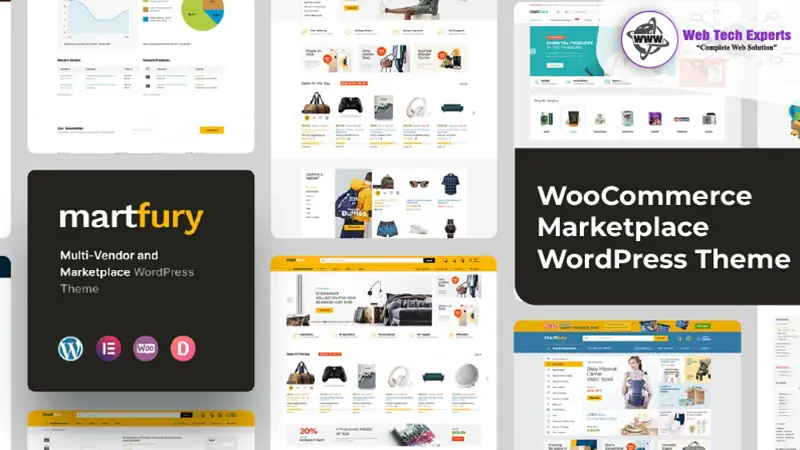
The Martfury WooCommerce Marketplace WordPress Theme has been developed mainly for online stores and multi-vendor marketplaces. Its design closely follows the layout used by large shopping websites, with prominent search bars, organized product categories, product filters, deal sections, and vendor-related features.
Martfury can be used for electronics, fashion, furniture, groceries, tools, automotive parts, accessories, and other product-based websites. It is also suitable for store owners who plan to expand their single-vendor shop into a multi-vendor marketplace later.
This review looks at Martfury from a practical perspective. It covers its main features, advantages, limitations, setup process, and the type of business that can get the most value from it.
About Martfury—WooCommerce Marketplace WordPress Theme
Martfury is a premium eCommerce theme created for WordPress and WooCommerce. It supports both regular online stores and marketplace websites where different sellers can add and manage their products.
The theme integrates well with well-known marketplace plugins such as Dokan, WC Vendors, WCFM Marketplace, and MultiVendorX. These plugins handle vendor registration, commissions, withdrawals, store dashboards, and product management, while Martfury controls the customer-facing design.
This distinction is important. Martfury does not replace a marketplace plugin. It provides the design, layouts, and shopping features needed to present a multi-vendor website properly.
The theme offers several ready-made demos for different store types. Instead of building every page from an empty screen, website owners can import a demo and then replace the sample products, banners, colors, and text with their content.
Its layouts give more space to products than decorative elements. The customers can view the categories, offers, price, ratings, and product descriptions without surfacing unneeded sections. This works for stores where fast product discovery has a higher priority than complex animations.
Main Features of Martfury
WooCommerce-Based Store Setup
Martfury works with WooCommerce, which manages the main store operations. You can add physical products, digital products, variable products, grouped items, and affiliate products.
WooCommerce also handles inventory, tax settings, customer accounts, coupons, payment methods, and shipping rules. This gives store owners access to a large collection of extensions when additional functions are required.
Multi-Vendor Marketplace Support
A marketplace website needs separate facilities for vendors and customers. Martfury supports popular multi-vendor plugins that allow sellers to register, create stores, upload products, check orders, and request withdrawals.
The exact vendor features depend on the marketplace plugin you choose. For example, commission settings, subscription plans, vendor verification, and delivery management may require specific plugin versions or paid extensions.
Before selecting a marketplace plugin, check its feature list carefully. If you change the vendor system after adding sellers and products, you will create unnecessary work.
AJAX Product Search
Search is one of the most useful parts of a large online shop. Martfury includes live product search, allowing visitors to see relevant suggestions while typing.
Customers can search by product name, category, or SKU, depending on the store configuration. This reduces the number of steps required to reach a product page.
The search bar is displayed prominently in many Martfury header layouts. That works particularly well for electronics, hardware, and spare-parts stores, where customers often arrive with a specific product or model in mind.
Product Filtering
Martfury supports AJAX-based shop filters. Customers can narrow products by category, price, color, size, brand, and other attributes without fully reloading the page.
Good filtering becomes essential when a category contains dozens or hundreds of products. However, the store administrator must create product attributes properly. A filter cannot work accurately when product data is incomplete or inconsistent.
For example, using “Black,” “black color," and "Black" as separate values creates a messy filter. Product information should follow a fixed format from the beginning.
Ready-Made Store Layouts
The theme includes several homepage and shop layouts. These layouts cover common online-store styles, including electronics marketplaces, furniture stores, fashion shops, and general retail websites.
Demo import can save time, but it should be treated as a starting point. Keeping every demo banner, section, and product block often makes the final website look crowded. Remove anything that does not help customers browse or buy.
Elementor Compatibility
Martfury supports Elementor, so users can edit many page sections through a visual interface. Elementor is handy for building homepages, promotional landing pages, information pages, and content for different product categories.
You can move sections, change images, edit headings, and control spacing without working directly with theme files.
However, WooCommerce templates like your product pages, cart pages, and account pages may adhere to theme settings rather than the regular Elementor controls. If you want to make more advanced changes, you’ll likely need to add custom CSS, a child theme, or work with a WordPress developer.
Header and Navigation Options
A large store needs clear navigation. Martfury offers several header designs with search, category navigation, account links, wishlist icons, and cart details.
It also comes with support for mega menus, which let you display multiple product categories in one organized dropdown. HTTP method alternatives: kind of: Useful for when we have websites where products span many departments.
A simple menu structure should be maintained. Incorporating every category in the main navigation confuses users, particularly on mobile. This means that we should prioritize categories for important departments, while marginal subcategories can stay within dropdown menus.
Product Quick View
Quick View gives shoppers the ability to see key product details without leaving the current shop page. They can view images, pricing, availability, and purchase options in a pop-up window.
This feature helps customers compare several products quickly. It works best when the popup loads fast and contains only the information required for a buying decision.
Wishlist and Product Comparison
Martfury can display wishlist and comparison features when the required supporting plugins are active.
A wishlist lets customers save products for later. Product comparison helps them review specifications, prices, and features together. Both options are useful for products that require more thought before purchase, such as electronics, appliances, furniture, or equipment.
Product Variation Swatches
Variable products usually use dropdown fields for options such as color and size. Martfury can present these choices as color circles, images, or labels.
Swatches make product options easier to understand and can improve the appearance of product pages. They are especially helpful for fashion, footwear, furniture, and mobile-accessory stores.
Mobile Shopping Layout
Martfury uses responsive layouts that adjust to desktop, tablet, and mobile screens. Product grids, menus, filters, and buttons resize according to the device.
Responsive design alone does not guarantee a good mobile experience. Store owners should test category filters, sticky buttons, variation selectors, checkout fields, and payment screens on real devices before launch.
Large banner images and too many homepage sections can slow mobile browsing. Use compressed WebP images and avoid plastering desktop-sized graphics on smaller screens.
Martfury Pros and Cons
Pros
• Designed mainly for WooCommerce marketplaces
• Works with popular multi-vendor plugins
• Clean and responsive design
• Useful product search and filtering options
• Compatible with Elementor
• Includes several homepage layouts
Cons
• Beginners may need some time to learn all the features
• A paid license is required
• Some features rely on additional third-party plugins
• Large marketplaces may require better hosting
• Initial setup can take longer than a basic WooCommerce theme
• The large number of settings may feel confusing at first
Performance and Store Speed
Martfury can handle large product volumes; however, the theme is only one element of how efficiently a store performs. But hosting quality, product pictures themselves, database size, number of active plugins, and third-party scripts also influence loading time.
A small shared hosting option will suffice during the development phase, before potentially breaking down once your site starts receiving any real traffic or contains thousands of products.
For better performance you should use good WooCommerce hosting, page caching, object caching, and a content delivery network where applicable. Compress product images before uploading them and do not install plugins that duplicate functions that are already included in the theme.
WooCommerce cart, checkout, and account pages should not use normal page caching. Configure the caching plugin carefully and test the complete purchasing process after making any performance changes.
A clean setup with only necessary plugins will usually perform better than a website filled with separate add-ons for popups, sliders, badges, filters, and animations.
Martfury Stats and Verdict
Martfury has remained a recognized marketplace theme for several years and has attracted a substantial number of sales and user reviews on theme marketplaces. Earlier published figures recorded more than 12,000 sales and an average rating of around 4.75 out of 5, although live sales and rating totals can change over time.
Its strongest area is product discovery. The large search bar, category navigation, product filters, deal sections, and comparison tools fit websites with broad catalogues.
The theme is less suitable for a very small shop selling only five or ten products. In that situation, many of its marketplace functions may never be used, and a lighter WooCommerce theme could be easier to manage.
Martfury makes more sense for a growing retailer, electronics shop, wholesale store, or multi-vendor business. It gives the website owner a solid store structure without forcing them to design every WooCommerce page from the beginning.
Verdict: Martfury is a practical choice for medium and large WooCommerce stores that need strong search, filtering, and marketplace support. It can also serve a single-vendor shop that expects to add more categories, products, or sellers in the future.
Martfury installation guide
Step 1: Prepare WordPress
Check that WordPress is installed on your hosting account and working perfectly. Setup SSL for your website to come through HTTPS, because customers will most likely be entering personal and payment information at checkout.
Step 2: Get the Theme Files
Buy the theme and download the full Martfury package. Extract the main package on your computer and locate the installable theme ZIP file.
Do not upload the entire download package if it contains documentation, license information, and additional files. WordPress only accepts the installable theme ZIP file.
Step 3: Upload Martfury
Log in to WordPress and open:
Go to Appearance → Themes → Add New → Upload Theme.
Then, select the Martfury ZIP file > click on Install Now > wait for WordPress to install.
Step 4: Activate the Theme
Once the installation is complete, click "Activate." Then the theme might show a notification suggesting essential and optional plugins.
Step 5: Install Required Plugins
Install WooCommerce, the Martfury core plugin, Elementor, and any other required plugins shown in the theme dashboard.
Only install a multi-vendor plugin when you actually plan to allow outside sellers. A standard single-store website does not need Dokan, WCFM, or another vendor system.
Step 6: Import a Demo
Open the demo importer and choose the layout closest to your planned store. Import the content, widgets, and theme settings.
Demo import may take several minutes, depending on server resources. Do not close the browser tab during the process. The official documentation provides setup and import guidance for new installations.
Step 7: Complete WooCommerce Settings
Run the WooCommerce setup and enter your store address, currency, product type, shipping zones, tax rules, and payment details.
Check each setting instead of accepting every default value. Incorrect currency, shipping, or tax configuration can create problems after orders begin.
Step 8: Replace Demo Content
Delete sample products, banners, categories, and menus not related to your store. You upload your logo and get to add the actual images, description, price, and stock of all your products.
Step 9: Configure Marketplace Features
Set up vendor registration, commissions, product approval, withdrawal methods, and seller terms for a multi-vendor mart.
Test the vendor dashboard by making a test seller account. Ensure that vendors can add products without going into the main WordPress administration area.
Step 10: Test the Store
Test places your test orders from desktop and mobile. Perform a test of product search, filters, coupon codes, shipping charges, payment gateways, and emails to customers about order statuses.
Once every key step works correctly, remove demo data, enable the live payment mode, and launch the store.
Frequently Asked Questions
Is Martfury suitable for a multi-vendor store?
Yes. It supports a number of popular WooCommerce marketplace plugins, including vendor registration, product management, and commission management.
Can Martfury be used for a single-vendor website?
Feed is available for a standard WooCommerce store or single-vendor site without installing multi-vendor.
Does Martfury work with Elementor?
Yes. Elementor can be used to edit many pages and home page sections using a visual interface.
Is Martfury suitable for newbies?
Demonstration import and basic settings can be edited by any beginner, but a more complex marketplace setup may need a tech specialist
Does Martfury load quickly?
It can load well with suitable hosting, compressed images, caching, and a limited number of properly selected plugins.